Top 10 Software Testing Tools Every QA Team Should Know
Software quality has become a critical factor in today’s competitive digital landscape. Businesses need reliable applications that perform consistently across devices, browsers, and environments.
To achieve this level of quality, QA teams rely on specialized software testing tools that help identify bugs, automate repetitive tasks, improve test coverage, and accelerate product releases.
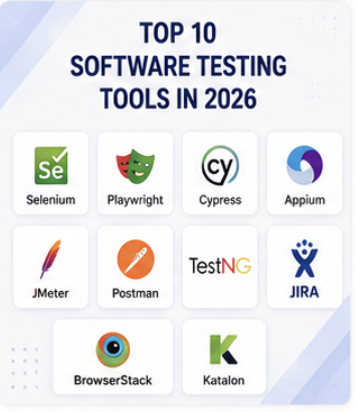
In this article, we’ll explore the top 10 software testing tools that every QA team should know and how they help deliver high-quality software products.
Businesses often combine Manual Testing and Automation Testing to improve software quality and reduce release risks.
What Are Software Testing Tools?
Software testing tools are applications and frameworks used by QA professionals to plan, execute, automate, manage, and monitor software testing activities.
These tools help teams:
- Improve software quality
- Reduce testing time
- Increase test coverage
- Detect defects earlier
- Support CI/CD pipelines
- Accelerate software releases
Modern QA teams typically use a combination of automation, API, mobile, performance, and test management tools.
Why QA Teams Use Testing Tools
Testing tools provide several advantages:
- Faster test execution
- Improved accuracy
- Better reporting and tracking
- Increased productivity
- Reduced manual effort
- Support for continuous testing
Choosing the right tools depends on project requirements, technology stack, and testing goals.
1. Selenium
Selenium is one of the most popular open-source automation testing tools used for web application testing.
Key Features
- Supports multiple browsers
- Supports Java, Python, C#, JavaScript
- Cross-browser testing
- Open-source and widely adopted
Best For
- Web Automation Testing
- Regression Testing
- Functional Testing
2. Playwright
Playwright is a modern automation testing framework developed for reliable end-to-end testing.
Key Features
- Supports Chromium, Firefox, and WebKit
- Fast execution
- Auto-wait functionality
- Excellent test stability
Best For
- Modern Web Applications
- End-to-End Testing
- Cross-Browser Testing
3. Cypress
Cypress has become one of the most preferred tools for frontend application testing.
Key Features
- Easy setup
- Real-time execution
- Built-in debugging
- Developer-friendly interface
Best For
- Frontend Testing
- Web Application Testing
- Continuous Integration
4. Appium
Appium is an open-source framework used for mobile automation testing.
Appium is widely used for Mobile App Testing across Android and iOS devices
Key Features
- Android testing
- iOS testing
- Cross-platform support
- Supports multiple programming languages
Best For
- Mobile App Testing
- Mobile Automation Testing
5. Postman
Postman is one of the most widely used API testing platforms.
Postman helps QA teams perform efficient API Testing and integration validation
Key Features
- API request management
- Automated API testing
- API documentation
- Team collaboration
Best For
- API Testing
- REST API Validation
- Integration Testing
6. JMeter
Apache JMeter is a powerful performance testing tool used to evaluate application scalability.
Performance-focused tools such as JMeter and LoadRunner support advanced Performance Testing activities.
Key Features
- Load testing
- Stress testing
- Performance monitoring
- Detailed reporting
Best For
- Performance Testing
- Load Testing
- Scalability Testing
7. BrowserStack
BrowserStack provides cloud-based cross-browser and cross-device testing.
Key Features
- Real device testing
- Browser compatibility testing
- Cloud infrastructure
- Extensive device coverage
Best For
- Cross-Browser Testing
- Compatibility Testing
8. TestRail
TestRail is a popular test management platform.
Key Features
- Test case management
- Reporting dashboards
- Test execution tracking
- Team collaboration
Best For
- Test Management
- QA Process Tracking
9. Jira
Jira is widely used for bug tracking and project management.
Key Features
- Defect tracking
- Agile workflows
- Sprint planning
- Team collaboration
Best For
- Bug Tracking
- Project Management
10. LoadRunner
LoadRunner is an enterprise-grade performance testing solution.
Key Features
- Large-scale load testing
- Performance monitoring
- Advanced analytics
- Enterprise support
Best For
- Enterprise Performance Testing
- High-Traffic Applications
How to Choose the Right Software Testing Tool
When selecting a testing tool, consider:
Project Type
Web, Mobile, API, or Enterprise Applications.
Budget
Open-source tools are cost-effective, while enterprise tools offer advanced capabilities.
Team Skills
Choose tools that align with your team’s technical expertise.
Scalability Requirements
Consider future growth and testing demands.
Integration Support
Ensure compatibility with CI/CD pipelines and existing development workflows.
How Propark Softech Helps
At Propark Softech, we use industry-leading software testing tools to deliver reliable QA services for startups, SMEs, and enterprises.
Our team specializes in:
- Manual Testing
- Automation Testing
- Mobile App Testing
- API Testing
- Performance Testing
- Cross-Browser Testing
We select the right testing tools based on project requirements to ensure maximum software quality and faster releases.
Conclusion
Software testing tools play a vital role in delivering reliable, secure, and high-performing applications.
Whether you’re performing automation testing, API testing, mobile testing, or performance testing, selecting the right tools can significantly improve software quality and testing efficiency.
By leveraging modern testing solutions such as Selenium, Playwright, Cypress, Appium, Postman, and JMeter, QA teams can streamline testing processes and deliver exceptional user experiences.
At Propark Softech, our QA Testing Services help organizations deliver reliable and high-quality software.